Post Name

What is a Key Cover?

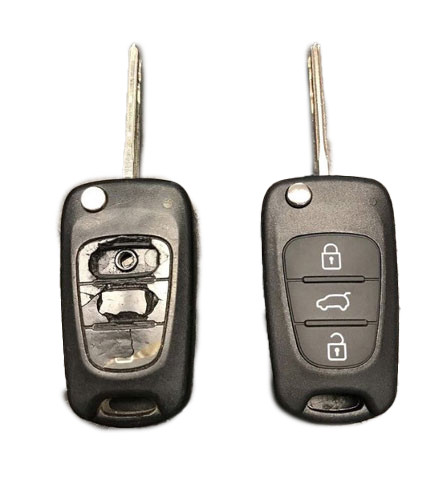
A key cover, often referred to as a key shell or key case, is the outer part of your key. It houses the electronic board, chip, and battery but excludes the internal electronics themselves. If your key casing is damaged, there’s no need to replace the entire key – just changing the key cover can restore its durability and usability while saving you money.

When Do You Need a New Key Cover?

You might need a key cover replacement when:

  • The buttons on your key become worn out or stop responding.
  • The outer case cracks, exposing the internal electronics.
  • The key mechanism no longer functions smoothly.
  • You want to refresh the appearance of your key with a new, sturdy shell.

Instead of struggling with a faulty key, simply replace the cover and extend the lifespan of your original key!

How to Choose the Right Key Cover?

When selecting a replacement key cover, consider the following factors:

  • Button Layout: Ensure that the number of buttons and their symbols match your existing key.
  • Blade Shape: If your key includes an integrated blade, make sure the new shell accommodates it correctly.
  • Quality: A good-quality key cover ensures a snug fit, smooth functionality, and long-lasting durability.

At MR-KEY, we offer a variety of key covers designed to match your specific car model perfectly, providing both aesthetics and functionality.

How to Change Your Key Cover?

Replacing your key cover is simple and doesn’t require professional assistance. Here’s how:

  1. Purchase a compatible key cover from our website.
  2. Open your old key case carefully.
  3. Transfer the electronic board and chip from your original key to the new key cover.
  4. Reassemble the key, ensuring all components fit securely.
  5. Test the buttons and functions to confirm everything is working properly.

For step-by-step guidance, we provide video tutorials on our website, showing you exactly how to change your key shell and even replace the battery if needed.

What Else Can You Change When Replacing the Key Cover?

While changing your key cover, it's the perfect time to:

  • Replace non-functional click buttons on your key’s electronic board.
  • Change the battery since you're already disassembling the key, ensuring it lasts longer.

At MR-KEY, we strive to make key replacements easy, affordable, and accessible to everyone. Explore our website to find the perfect key cover, key cutting services, and useful video guides to help you maintain your car key like a pro!

Gerelateerde Berichten

The Importance of Having a Spare Car Key: What Every Driver Should Know

The Importance of Having a Spare Car Key: What Every Driver Should Know

When it comes to car ownership, many of us take pride in maintaining our vehicles. We keep up with oil changes, tire rotations, and insurance renewals. But there’s one crucial aspect that many drivers overlook: having a spare car key. It might seem like a small detail, but nearly 40% of car owners don’t have a backup key for their vehicle. That’s a risk you might not want to take. Let’s explore why having a spare car key is so important and how it can save you time, money, and frustration. The Hidden Risks of Having Only One Key You may think that having just one car key is fine—after all, you always know where it is, right? But life has a funny way of surprising us, and car keys get lost or damaged more often than you might think. Here are some common risks you face when relying on just one key: Lost Keys : Losing your only car key can leave you stranded. Whether you're in a rush for work or on your way to an important event, misplacing your key means you're stuck until you find it—or worse, until you get a replacement. Key Damage : Keys, like anything else, wear out over time. A bent or broken key can cause problems with your car’s ignition, and if it's your only one, you’re in for a headache. Lockouts : It’s easy to accidentally lock your keys inside your car. Without a spare key, you’ll need to figure out how to regain access—both costly and inconvenient. Theft : If someone steals your key, not only are you locked out of your car, but you also face a potential security risk. A spare key can give you quick access and peace of mind while you handle the situation. Why a Spare Key Is a Lifesaver Having a spare key is more than just a backup plan; it’s a practical solution that can save you in many situations. Here’s why having a spare key should be on your to-do list: Saves You Time : If you’ve ever lost a key, you know how time-consuming it can be to get a replacement. With a spare key, you can avoid the wait and get back on the road quickly. Prevents Expensive Lockouts : Getting locked out of your car is stressful and costly. Emergency situations like this can cost you not just time but money, and depending on the circumstances, you might even need additional assistance. Convenience for Multiple Drivers : If you share your car with a spouse, roommate, or family member, having a spare key allows both of you to have access without needing to coordinate every trip. Peace of Mind : With a spare key, you won’t have to worry about the “what if” scenarios. It’s a simple safety net that ensures you’re never completely stranded. Affordable Solutions for Replacing Your Car Key You might be wondering how to go about getting a spare key. Fortunately, the process has never been easier or more affordable. Gone are the days when you had to rely on expensive or complicated processes to secure a replacement key. Here are some practical ways to get a spare key: Online Key Replacement Services : Many services offer easy, affordable options for getting a spare car key. Simply upload a photo of your key, and you’ll receive a replacement. Automotive Dealerships : Dealerships provide spare keys for almost any car make or model. However, this option is often more costly and may require you to bring the car in for verification and programming. How to Choose the Right Key Replacement Option When deciding on how to get a spare key, consider these factors: Cost : Depending on the service or method you choose, prices can vary. Evaluate your budget and the type of key your car requires before proceeding. Convenience : For some, the most convenient option is one that doesn’t require in-person visits. Research which option offers the best balance between time and convenience for your needs. Speed : Depending on your urgency, choose an option that fits your timeframe. Some services offer express options, while others may take longer. Don’t Wait Until It’s Too Late Many car owners don’t think about getting a spare key until they’re faced with an emergency. Don’t let that be you. Having a backup key is a small investment that can save you from significant stress and financial strain down the line. Take action today and make sure you have a spare key for your vehicle. Whether it’s for a just-in-case moment or for daily convenience, having that extra key can make all the difference when you need it most.

Effortlessly Ordering Multiple Replacement Car Keys: A Step-by-Step Guide

Effortlessly Ordering Multiple Replacement Car Keys: A Step-by-Step Guide

As a car owner, managing multiple key replacements can be daunting. Fortunately, there's a streamlined method to order several keys simultaneously using a CSV file. Here's how you can simplify the process: 1. Prepare Your Key List Create a Spreadsheet: Use software like Microsoft Excel to list your key codes. Enter Details: In Column A, input each key code; in Column B, specify the quantity needed. Avoid Headers: Start directly with your data; do not include column titles. 2. Save as CSV Choose CSV Format: When saving, select 'CSV (Comma delimited)' from the 'Save as type' dropdown. Ensure Correct Format: Avoid other CSV formats to prevent compatibility issues. 3. Upload Your CSV File Access Your Account: Log into your trade account on the key replacement website. Navigate to Product Page: Find the specific key product you need. Upload CSV: Click the 'Upload a CSV' button above the key number entry field and select your file. Wait for Processing: Large files may take time to upload; remain on the page until completion. 4. Complete Your Order Add to Basket: Once uploaded, click 'Add to basket.' Proceed to Checkout: Follow the standard payment process to finalize your order. Important Considerations Separate Files for Different Keys: If ordering various key types or series, create individual CSV files for each. Trade Account Requirement: This feature is typically available to trade account holders; ensure you have the necessary access. By following these steps, you can efficiently manage bulk key replacements, saving time and ensuring accuracy.

How to Upgrade Your Car Key: A Step-by-Step Guide

How to Upgrade Your Car Key: A Step-by-Step Guide

Upgrading your car key can significantly improve your vehicle’s security and make your daily routine more convenient. Whether you’re upgrading from a basic key to a remote key or stepping up to a smart key, this guide will take you through the entire process, step by step, ensuring a smooth transition. Understanding Your Key Type Before you start the upgrade process, it’s important to know which type of key you currently have. Here are the most common key types: Traditional Metal Keys : These are basic, mechanical keys, common in older vehicles. They don’t have any electronic components. Transponder Keys : These have an electronic chip inside the key head that communicates with the vehicle’s computer system for added security. Remote Keys : These keys have buttons to lock/unlock the doors remotely and usually have a physical blade as a backup. Understanding your current key type will help guide your decision on the best upgrade path. Choosing the Right Upgrade Once you know what type of key you have, you need to decide what features you want in your upgraded key. Some options to consider are: Remote Locking : Allows you to lock/unlock the doors from a distance. Keyless Entry : Lets you unlock the car without taking the key out of your pocket. Smart Key : Offers advanced functions such as proximity unlocking, push-button start, and remote engine start. Take some time to research the options available for your specific car model. Many car manufacturers offer compatible upgrades for different key types, so it’s important to consult your dealership or a trusted locksmith for recommendations. Gathering What You’ll Need Before starting the upgrade process, make sure you have the following materials: The New Key : This could be a transponder key, remote key, or smart key. Your Original Key : You’ll need this as a reference throughout the process. Key Programming Device : Some keys require a special device to pair the key with your car. Car Manual or Programming Guide : It’s always a good idea to have your car’s manual handy for specific instructions. Having everything ready will make the process much smoother. Step-by-Step Upgrade Process Purchase the New Key Start by purchasing your new key. You can buy it from your car’s dealership, a certified locksmith, or a trusted online retailer. Make sure that the key is compatible with your vehicle’s make and model. Transfer Electronics (if necessary) If your new key is just a shell, you will need to transfer the internal components from your old key. This includes the transponder chip and, if applicable, the key blade. Be careful when transferring the electronics to avoid any damage. Program the Key Programming the new key is crucial for it to work with your vehicle. Here’s a general guide: Insert the original key into the ignition and turn it to the ON position. Quickly remove the original key and insert the new key. Turn the new key to the ON position and wait for the security light to turn off. This might take a few minutes. Test the New Key After programming, it’s important to test the new key to ensure everything works properly. Check the following functions: Locking and unlocking the doors Starting the engine Any additional functions like remote trunk opening or proximity unlocking Troubleshooting Common Issues If your new key isn’t working as expected, don’t worry! Here are some common problems and their solutions: Key Not Recognized : Check if the transponder chip is properly placed in the key. Key Doesn’t Start the Car : Double-check the programming steps to ensure everything was done correctly. Buttons Don’t Work : Verify that the battery in the new key is properly installed and functional. If the problem persists, it’s best to consult a professional locksmith or visit your dealership for further assistance. Upgrading your car key is an excellent way to improve both the security and convenience of your vehicle. By following these steps, you’ll be able to transition smoothly to your new key. If you run into any issues, don’t hesitate to reach out to a professional locksmith who can help you along the way. Enjoy the benefits of your new car key and the added peace of mind that comes with enhanced security.

Programming Your Car’s Keyless Remote: A Simple Guide for Every Car Owner

Programming Your Car’s Keyless Remote: A Simple Guide for Every Car Owner

When it comes to convenience, car keyless remotes have revolutionized the way we interact with our vehicles. No more fumbling with traditional keys or worrying about locking yourself out. With just a push of a button, you can lock, unlock, and even start your vehicle. But what happens when your keyless remote stops working, or when you need to program a new one? Here’s a simple guide to help you program your car's keyless remote, regardless of your vehicle's make or model. Understanding Keyless Remotes Before jumping into the programming process, it’s important to understand what a keyless remote is and how it works. Essentially, a keyless remote allows you to interact with your vehicle without needing to physically insert a key. Instead of using a traditional metal key, your car’s electronic system communicates wirelessly with the remote, allowing you to lock, unlock, and sometimes even start your vehicle, all with the push of a button. These remotes typically use a radio frequency to communicate with your car, sending a signal that’s encrypted for security. Most modern cars use transponder technology, which makes the system more secure and resistant to hacking or copying. This means that the remote must be properly programmed to your vehicle’s system to function correctly. When Do You Need to Program a Keyless Remote? There are several situations in which you might need to program your keyless remote: Replacing a Lost or Damaged Remote : If you’ve lost your keyless remote or it’s no longer functioning properly, you’ll need to get a replacement. This may require programming the new remote to sync with your vehicle. Adding a New Remote : If you’ve bought an additional keyless remote for your car (for a spouse, child, or other family member), you’ll need to program it so that it works with your vehicle. Battery Replacement : Sometimes, replacing the battery in your remote can cause the programming to reset, meaning you’ll need to reprogram the remote for it to work again. Changing or Resetting Vehicle Settings : Occasionally, vehicle settings or remotes can be reset or reprogrammed as part of regular maintenance, requiring you to program new or additional remotes. How to Program Your Car’s Keyless Remote Programming a keyless remote is easier than you might think, and in most cases, it can be done by following a few simple steps. The process varies slightly depending on the make and model of your car, but here’s a general overview of the steps involved: Get Your New or Replacement Remote : Ensure that your remote is compatible with your car’s system. If you're not sure, you can check with your car's manufacturer or an authorized dealership. Some remotes require specific codes to be programmed. Sit Inside Your Vehicle : For safety and security reasons, most cars require you to be inside the vehicle while programming the remote. Insert the Key in the Ignition : Insert the key into the ignition and turn it to the "ON" position without starting the engine. For cars with push-to-start systems, you may need to press the start button without pressing the brake pedal. Activate the Programming Mode : Depending on your car’s system, you’ll need to follow a sequence of steps to enter programming mode. This could involve turning the key on and off several times, or pressing certain buttons in a specific order. Refer to your vehicle’s manual for the exact steps, as the process can differ from one model to another. Program the Remote : Once your car is in programming mode, you’ll need to press the button on your keyless remote that you want to program. Usually, you’ll hear a chime or see the lights flash, indicating that the remote has been successfully programmed. Some cars may require you to press the button several times to ensure proper synchronization. Test the Remote : After programming, test the remote to make sure it works properly. Try locking and unlocking the doors or starting the engine. If everything works as expected, you’re done! Exit Programming Mode : To finish the process, simply turn off the ignition and remove the key. This should exit programming mode. If you have additional remotes to program, repeat the steps above for each one. What to Do if Programming Doesn’t Work While programming a keyless remote is usually a straightforward process, there are instances where things don’t go as planned. If your remote isn’t syncing with your car after following the steps, here are a few troubleshooting tips: Check the Battery : If the remote’s battery is dead or weak, it won’t transmit the signal to your car. Replace the battery and try programming again. Verify the Compatibility : Make sure that the remote is compatible with your vehicle’s make, model, and year. Some vehicles require special remotes that can only be programmed by the manufacturer or an authorized locksmith. Reset Your Vehicle’s System : In some cases, you might need to reset the car’s system to clear previous programming attempts. Check your owner’s manual or consult a professional for assistance. Consult a Professional : If you continue to have issues, it might be time to visit a dealership or a certified locksmith. These professionals have the tools and experience to program the remote correctly and ensure everything works seamlessly. Why Programming Your Keyless Remote Is Important Programming your keyless remote is a simple but important task that helps ensure your car’s security and convenience. By understanding how the process works and what to do if things go wrong, you’ll be able to troubleshoot and solve any issues quickly. Whether you’re replacing a lost remote or adding a new one to your collection, knowing how to program your remote saves time and money compared to visiting a dealership or locksmith. With the increased reliance on keyless remotes for unlocking and starting vehicles, it’s essential for every car owner to be familiar with this process. By keeping your remote in good working condition and knowing how to program it when necessary, you’ll enjoy a smoother, more efficient experience with your vehicle.

Chat met ons