
Post Name

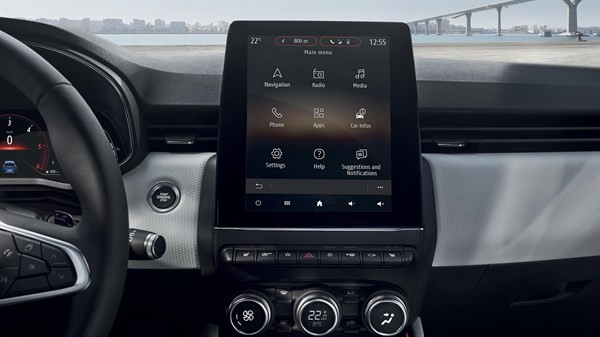
Modern cars often pack large touchscreens into the dash, and keeping these displays clear is key to enjoying every drive. A single scratch or dirty spot can make maps and menus hard to read. Car insurers warn that infotainment screens are surprisingly fragile – even a small dent or scratch can disable parts of the system . Worse, replacing a built-in navigation unit can cost thousands and take weeks . The good news? A little proactive care goes a long way.


Interior dashboards are loaded with touchscreens that easily pick up scratches and smudges. For example, a high-quality navigation screen protector can shield your display from daily wear . These protectors are often made of tough 9H-tempered glass with an oleophobic coating (to repel fingerprints) and an anti-glare matte finish . A properly fitted protector keeps your screen looking brand-new and makes cleaning simpler.
Invest in a Quality Screen Protector


Choose the right fit
 Get a protector cut for your car’s make and model so it covers the entire display without blocking cameras or buttons.

Hydrogel protector over tempered glass

A hydrogel navigation screen protector is the best modern option for car screens. Unlike tempered glass, hydrogel film is flexible, ultra-thin, and self-healing — meaning small scratches disappear on their own over time. Hydrogel also fits curved or irregular screens better, doesn’t crack or chip like glass, and offers excellent clarity with strong anti-scratch and anti-glare properties. It maintains perfect touch sensitivity and blends seamlessly with the original display. To understand the real differences between hydrogel film and tempered glass — and which one offers the best long-term protection for your car — check out our detailed comparison guide: Hydrogel vs Tempered Glass Navigation Protectors Comparison.

Anti-glare & oleophobic coatings
 Many navigation screen protectors include a matte, anti-glare surface. This scatters harsh sunlight and helps repel fingerprints and oil. (Some even advertise oleophobic layers that resist smudges.)

Installation matters

Follow the instructions carefully (clean the screen first, align the film, and smooth out bubbles). A misaligned or bubbled protector can itself cause visibility issues.

Installing a car screen protector isn’t just about preventing scratches. It also helps maintain screen clarity over time. As one Tesla owner discovered, adding a new glass protector made even a worn, glare-prone screen “look almost new again”


If you’ve already chosen a hydrogel protector and want to install it correctly, follow our step-by-step guide on how to install a hydrogel navigation screen protector.

Clean Your Screen the Right Way


Fingerprints, dust and grease are everyday enemies of visibility. But cleaning improperly can do more harm than good. Follow these expert tips:

Use a microfiber cloth

Wipe the screen with a soft, clean microfiber towel – even better if it’s dedicated just to your screen . This gentle fabric removes oils without scratching the glass.

Spray cleaner on the cloth, not the screen

If you need liquid cleaning, lightly mist it onto the cloth first. Never spray cleaners or water directly onto the touchscreen . Too much liquid or harsh chemicals can seep into seams or damage any oleophobic coatings.

Avoid household glass cleaners

Standard window cleaners (with ammonia or alcohol) can strip away protective coatings or damage the display . In fact, Car and Driver cautions that you should “avoid using household glass cleaner on your car’s touchscreen” unless you know it’s ammonia- and alcohol-free .

Use fresh wipes

Always use a clean side of your cloth or a new wipe on the screen. AGWS (an auto insurer) advises against using a cloth or wipe that’s already been on the dashboard or door panels – it can transfer grit and actually scratch the display

Detail with precision

If dirt or fingerprints linger, dampen the cloth with plain water or a gentle, screen-safe cleaner and buff in small circles. For stubborn spots, a second dry pass with the microfiber cloth will remove streaks.


Wipe smudges away with a soft cloth – spraying cleaner on the cloth, not on the screen . Clean your screen each time you wash the car, or whenever you notice foggy patches. In fact, one test found that many “interior detailer” sprays (like Chemical Guys or Meguiar’s) can work just as well as specialized screen cleaners if they’re labeled safe for screens.

Reduce Sunlight Glare


Glare is one of the biggest complaints with modern car touchscreens. It makes maps hard to read, increases eye strain, and leads to drivers pressing harder on the display—over time, this causes wear and visible marks.

To reduce glare:

Install a matte hydrogel screen protector

Adjust the display’s brightness and contrast

Avoid cleaning with shiny or oily cloths

Park with the dashboard away from intense sunlight when possible

Hydrogel films help significantly because they diffuse harsh reflections without dulling the screen.

Prevent Fingerprints and Smudges


Touchscreens are fingerprint magnets. Oils from your hands quickly accumulate on the surface, especially on climate controls or zoom gestures.

Solutions that actually work:

Oleophobic coatings (built into many hydrogel protectors)

Regular microfiber wipe-downs

Avoid touching the screen with sunscreen or lotion on your hands

Use voice commands for common actions when possible

Drivers notice a big difference after installing a car navi screen protector—much fewer smudges and much easier cleaning.

Protect the Screen During Everyday Use


Small habits reduce long-term wear:

Remove rings before using the touchscreen

Don’t store hard objects (keys, coins) near the display

Keep dust off the dashboard

Avoid pressing with fingernails

Use steering-wheel controls when possible

Tiny scratches add up, especially on softer automotive materials.


FAQ


What is the best way to protect a car navigation screen?

Installing a car-specific hydrogel screen protector provides the best protection against scratches, glare and fingerprints.

Do hydrogel protectors really self-heal?

Yes. The top layer softens slightly with heat and pressure, allowing micro-scratches to fade within minutes.

Do these protectors affect touch sensitivity?

No. Hydrogel films are extremely thin and designed to preserve the original touchscreen response.

Can I install a screen protector myself?

Hydrogel films are easy to install because they are flexible and bubble-resistant. Most people complete the installation in minutes.

Will a protector reduce screen brightness?

A high-quality hydrogel film maintains screen clarity while reducing harsh glare.

Do car manufacturers recommend screen protectors?

Many dealerships now advise using some form of screen protection due to rising replacement costs and increasing touchscreen sizes.

Which Cars Benefit Most

Some car brands benefit disproportionately from hydrogel screen protection — especially large-format touchscreens in premium models. If you want the full breakdown of the top models for 2025–2026, see our detailed guide on which cars benefit most from hydrogel navigation protection.

To protect your own car’s screen from scratches, glare and fingerprints, visit our shop at mr-key.com.


Related Guides

How to Install a Hydrogel Navigation Screen Protector

Which Cars Benefit Most From Hydrogel Navigation Protection? (2026 Overview)

Hydrogel vs Tempered Glass Navigation Protectors Comparison

Related Posts

Why Your Car Remote Isn’t Working and How to Fix It

Why Your Car Remote Isn’t Working and How to Fix It

Car remotes have become an essential part of modern vehicle ownership, offering convenience and added security. However, when they stop working, it can lead to frustration and delays. If you’ve ever faced a malfunctioning car remote, don’t worry—you’re not alone. Here’s a guide to help you understand the common reasons why your car remote might fail and how you can fix the issue quickly and affordably. 1. Dead Battery: The Usual Suspect One of the most common reasons for a non-functional car remote is a dead battery. Over time, the small coin batteries in your remote lose their charge, making the remote unusable. Signs of a Dead Battery: Reduced range, inconsistent functionality, or complete failure to respond. How to Fix It: Replace the battery with a compatible CR-type coin battery. Check your car manual or the remote’s casing for the correct battery type. Pro Tip: Always keep a spare battery in your glove compartment to avoid getting stranded. 2. Signal Interference: The Invisible Barrier Signal interference can block communication between your remote and your car. This can happen in areas with high electromagnetic activity or if the remote’s signal is weakened. Common Causes: Proximity to cell towers, Wi-Fi routers, or even other key fobs . How to Resolve It: Move closer to your car and try again. Change your location if you’re in a crowded parking area. Keep your remote away from other electronic devices that might cause interference. Prevention Tip: Avoid storing your car remote near electronics when not in use. 3. Remote Needs Reprogramming Sometimes, a car remote loses its programming, which is essential for communicating with your car. This can happen after battery replacement, electrical system resets, or software glitches. Signs Your Remote Needs Reprogramming: The buttons don’t respond, or the remote only works intermittently. What You Can Do: Check your car manual for DIY reprogramming instructions. If DIY methods fail, consult a professional locksmith or your car dealer for assistance. Pro Tip: Always reprogram your remote immediately after replacing its battery to avoid compatibility issues. 4. Physical Damage: More Than Just Wear and Tear Daily use, accidental drops, or exposure to moisture can damage your car remote, leading to malfunction. The internal components, such as the circuit board, are particularly sensitive. Signs of Damage: Cracks on the casing, loose buttons, or water ingress. How to Address It: For minor issues, replace the remote casing or repair loose buttons. If the circuit board is damaged, you’ll need a replacement remote. Preventative Measures: Use a protective key cover to shield your remote from damage. Keep your remote away from water and extreme temperatures. 5. Faulty Car Receiver: The Problem Isn’t Always the Remote In some cases, the issue lies with your car’s receiver rather than the remote. If the receiver is damaged or malfunctioning, it won’t recognize signals from the remote. How to Diagnose: If multiple remotes fail to work with the same car, the receiver might be the issue. Test your remote on a similar vehicle, if possible, to rule out the remote as the problem. How to Fix It: Consult a professional mechanic to inspect and repair the car’s receiver system. General Tips to Keep Your Car Remote Functional Prevention is better than cure, especially when it comes to car remotes. Here are some tips to avoid future issues: Regular Maintenance: Inspect your remote periodically for wear and tear. Store It Safely: Keep your remote in a safe, dry place to avoid accidental damage. Backup Plan: Always have a spare key or remote handy for emergencies. Invest in a Tracker: Attach a Bluetooth tracker to your remote for easy location if it gets misplaced. When to Seek Professional Help While many car remote issues can be resolved with DIY methods, some problems require professional assistance. If your remote still doesn’t work after troubleshooting, consult a locksmith or an automotive specialist. They can help with repairs, replacements, and reprogramming at an affordable cost. Don’t Let a Faulty Remote Slow You Down A malfunctioning car remote can be a hassle, but most issues are fixable with a little know-how. Whether it’s a dead battery, signal interference, or physical damage, understanding the root cause will help you resolve the problem efficiently. With proper care and maintenance, your car remote will continue to offer the convenience and security you rely on every day.

How Hot Weather Can Damage Your Car Key Fob – And What You Can Do About It

How Hot Weather Can Damage Your Car Key Fob – And What You Can Do About It

When you think about how hot weather affects your vehicle, your first thoughts might go to the engine, the tires, or maybe even the air conditioning. But there’s one small, essential part of your daily driving routine that’s often overlooked — your car key fob. It might seem like a tough little device, but the truth is, it’s far more sensitive than it looks. If you’ve ever left your key fob on the dashboard, in a hot glove box, or even inside your pocket during a heatwave, you may have already caused damage without realizing it. Car key fobs are built with delicate electronics, plastic shells, and lithium coin batteries — all of which are vulnerable to extreme temperatures. In this article, you’ll learn how hot weather affects each part of your key fob, how to spot the early signs of damage, and most importantly, what you can do to protect it. Taking just a few simple steps can save you from the cost and inconvenience of a non-functioning remote, especially when you least expect it. The Plastic Shell: First to Feel the Heat One of the first things to suffer from heat exposure is the plastic casing that protects your key fob. While it’s designed to withstand everyday use — being dropped, tossed in a bag, or handled frequently — it’s not built to survive hours in a baking-hot car. The interior temperature of a parked vehicle can soar past 60 or even 70 degrees Celsius on a sunny day, especially if the key is sitting directly in sunlight. Over time, this level of heat can soften the plastic, causing it to warp, bend, or even split at the seams. You may start to notice that your key doesn’t close as tightly as it used to, or the buttons may feel soft and spongy instead of firm. Cracks might appear along the sides, or parts of the shell may become discolored. While this might seem like a cosmetic issue at first, it has serious implications — a compromised shell allows moisture, dust, and debris to enter the fob, putting the internal electronics at risk. If your key fob’s shell is already showing signs of wear, especially after a hot summer, it’s time to consider replacing the casing before the damage gets worse. Battery Breakdown: How Heat Drains Power Inside your key fob, there’s usually a small lithium battery — typically a CR2032 coin cell. These batteries are reliable under normal conditions, but they don’t respond well to high temperatures. In fact, exposure to extreme heat can accelerate chemical breakdown inside the battery, leading to faster discharge and a shorter overall lifespan. What’s worse, in severe cases, the battery can swell or leak, which can damage the internal components of your fob permanently. If you’ve ever noticed your key fob suddenly stops working or becomes unreliable during the summer, there’s a good chance the battery is struggling under heat stress. The signal may become weaker, you might have to press buttons multiple times, or the remote might stop responding altogether. Replacing the battery is a quick and inexpensive fix, but it’s important to recognize that battery issues are often just the first symptom of deeper heat-related problems. Internal Electronics: Silent Victims of the Heat While the shell and battery are easier to see and replace, the most serious damage often happens silently — deep inside the electronic circuit board. This board, often referred to as the platine, is responsible for all communication between your key and your vehicle. It’s a compact, delicate system of soldered connections and microchips, and unfortunately, it’s not designed to cope with repeated thermal stress. When your key fob is exposed to fluctuating high temperatures, the constant expansion and contraction of materials can loosen solder joints or weaken connections. Moisture that gets trapped inside the shell during humid summer months can accelerate corrosion, especially if the casing is already cracked or loose. The damage might not be immediate, but over time you may find that your key fob becomes unpredictable — sometimes it works, other times it doesn’t, and eventually, it might stop working completely. What You Can Do to Prevent Heat Damage The good news is that most heat-related damage to key fobs is preventable with just a little care and awareness. First, never leave your key fob inside a parked car for extended periods, especially not in direct sunlight. It’s easy to toss your keys into the cup holder or leave them on the dashboard while you run errands, but those few minutes can expose them to dangerous levels of heat. Instead, keep your keys on you or store them in a shaded, temperature-controlled area. If you’re regularly in hot environments — such as driving in warm climates or working outdoors — consider investing in a protective silicone or leather cover. These not only shield the shell from heat exposure but also provide added protection against drops and dirt. You should also make it a habit to replace your battery once a year, even if it seems to be working fine. Batteries weakened by heat can fail suddenly, and a fresh cell ensures your key fob keeps working when you need it most. Finally, if your key fob’s shell is visibly worn or loose, replace it immediately. Many online stores, including Mr Key, offer affordable replacement shells that are easy to install and give your remote a like-new feel. Don’t wait for the damage to reach the internal electronics — by then, repair options are limited and usually more expensive. Protect Your Key, Protect Your Drive Your car key fob might be small, but it plays a huge role in your daily routine. From unlocking doors to starting your engine, it’s a modern convenience we all depend on — until it stops working. And while many drivers are careful with their car’s mechanical systems, few think twice about leaving their key fob in the heat. Now that you know how much damage summer temperatures can cause, you can take the steps needed to protect your key before it’s too late. If you’re looking for high-quality key shell replacements, batteries like the CR2032, or even complete key fobs compatible with your vehicle, Mr Key has you covered. Our online shop offers trusted parts for Peugeot, Citroën, Nissan, Suzuki, Fiat, and more — all designed to help you repair and maintain your car keys quickly and affordably.

What Makes EV Key Fobs Different from Traditional Car Keys?

What Makes EV Key Fobs Different from Traditional Car Keys?

When you think about car keys, you probably picture the classic remote fob—the one you click to lock or unlock your car from a short distance. For years, this type of key was the standard. But with the rise of electric vehicles (EVs), key fobs have changed more than you might think. They’ve become smarter, more secure, and packed with new technology that sets them apart from their traditional counterparts. So, what exactly makes an EV key fob different? Let’s dive into the world of modern keys and discover why electric vehicle fobs aren’t just an accessory—they’re a key part of the driving experience. Smarter Connections One of the most noticeable differences between EV key fobs and traditional ones is how much they actually “talk” to your car. Old-school fobs were pretty simple. They sent a basic signal to lock or unlock your doors and maybe popped the trunk if you were lucky. But EV key fobs are much more connected. Many of them communicate with the car’s internal system in real-time. When you press a button on an EV fob, you’re not just opening doors—you might be starting the climate control, checking the battery level, or even setting your seat to your personal position. Some fobs go a step further, automatically unlocking the car as you walk up or adjusting settings based on which key is nearby. It’s no longer just a key—it’s part of your driving profile. Software That Evolves Here’s something traditional key fobs can’t do: get smarter over time. EV key fobs often receive something called Over-The-Air (OTA) updates . Just like your phone or your laptop, your key fob’s software can be updated remotely. This can improve its performance, fix bugs, and even add new features. That means your EV key fob is no longer a “set it and forget it” device. It evolves with your car. Updates can make your key safer, faster, and more reliable without you ever stepping foot in a dealership. For some EV owners, their key fob today might already be more advanced than when they first got it. Stronger Security Security has always been important, but for modern EV key fobs, it’s taken to a whole new level. Traditional key fobs use basic encryption, which—unfortunately—has become easier for tech-savvy thieves to bypass. EV key fobs, on the other hand, often use advanced encrypted signals that change every time you use them. Some are even equipped with Ultra-Wideband (UWB) technology, which makes it nearly impossible for criminals to hack or clone the key’s signal. In a world where keyless car theft is becoming more common, these newer security features offer real peace of mind. Your key fob isn’t just a remote—it’s a digital handshake between you and your car that’s designed to keep you protected. A Little More Power-Hungry All these advanced features, constant communication, and longer-range signals come with a small trade-off: EV key fobs tend to use more battery power than traditional ones. You might notice that you need to replace the battery a bit more often, especially if your fob is always syncing with the car or receiving regular updates. The good news? Most EV key fobs still use common, affordable batteries like the CR2032, and replacements are quick and simple. It’s just something to be aware of if you’re used to your old key fob battery lasting for years without a second thought. The Future in Your Pocket EV key fobs are no longer just about opening doors—they’re smart devices that bring you closer to your car’s full potential. They offer more convenience, better security, and the ability to grow and improve over time. As the automotive world moves toward electric, key fobs are evolving right along with it. Whether you drive an EV today or plan to in the future, your key is becoming just as high-tech as the vehicle it unlocks. At Mr. Key , we’re here to help you keep your key fob in top condition—whether you need a battery, a new key shell, or expert advice on key maintenance. Explore our range of products and keep your smart key working like new. Visit us at mr-key.com for all your car key needs.

Cold Weather and Your Car Key Fob: What You Need to Know

Cold Weather and Your Car Key Fob: What You Need to Know

As the temperature drops and winter approaches, it’s not just your car’s engine that needs extra attention. Your car’s key fob is also affected by the cold weather, and it’s important to understand how frigid temperatures can impact its performance. In this article, we’ll explore how cold weather can affect your key fob and what you can do to prevent it from causing you frustration during the colder months. How Cold Weather Affects Your Key Fob Key fobs are small electronic devices designed to make our lives easier. They allow us to lock, unlock, and start our cars without ever having to take the key out of our pocket or bag. However, like any electronic device, key fobs are sensitive to extreme temperatures. When the temperature drops, the battery inside the key fob can be affected. Cold weather causes the battery’s chemical reactions to slow down, which can lead to a reduced charge or even a complete failure to operate. If your key fob suddenly stops working or becomes unresponsive, it's likely due to the cold weather affecting the battery's ability to function properly. In addition to battery performance, the cold can also cause the internal components of the key fob to contract. This may interfere with the fob’s functionality, causing it to not respond when you press the buttons. Furthermore, moisture from snow, rain, or condensation can get into the fob, which can cause short circuits or further damage. Signs Your Key Fob May Be Affected by the Cold If you live in an area where cold temperatures are common, it’s essential to be aware of the signs that your key fob might be struggling with the weather. Here are some indicators that the cold is affecting your key fob: Unresponsive buttons : If you press the buttons on your key fob and nothing happens, it may be due to the battery or the internal components not responding correctly to the cold. Delayed reactions : If you notice a delay in your fob’s response, where the locks or alarm take longer than usual to react, this is another sign of cold-induced malfunction. Reduced range : If your key fob is working, but only from a very short distance, it could be due to the battery’s reduced performance in the cold. If you notice these issues, don’t immediately panic. There are simple fixes and preventative steps you can take to resolve the issue. What You Can Do to Protect Your Key Fob in the Cold Fortunately, there are several things you can do to ensure that your key fob continues to work properly during cold weather. By taking a few precautions, you can protect the battery and internal components of your key fob from extreme temperatures: Keep Your Key Fob Warm One of the easiest ways to prevent cold weather from affecting your key fob is to keep it warm. If you're going outside during cold weather, keep your key fob in your coat pocket or a warm, insulated area. You can even use a small pouch or key fob holder with insulation to protect it from the cold. Replace the Battery Before Winter If your key fob is already showing signs of battery issues, consider replacing the battery before winter hits. Even if it’s not quite dead yet, replacing the battery can help ensure that your key fob works smoothly during colder months. Many key fob batteries are easy to replace and can be done at home with a simple tool. Use a Backup Key If you anticipate being in extremely cold conditions or live in a particularly harsh climate, consider having a backup key. Many cars come with a traditional key hidden inside the key fob, which you can use if the key fob stops working in the cold. Having this backup can save you a lot of hassle if your fob stops working unexpectedly. Avoid Moisture Exposure It’s important to keep your key fob dry, especially in winter, when snow, rain, and condensation can cause moisture to build up inside. If your fob does get wet, dry it thoroughly as soon as possible and avoid leaving it outside in damp conditions. If moisture persists, it may cause the internal components to fail. Test Your Key Fob Regularly To ensure that everything is working properly, make a habit of testing your key fob regularly, especially during the colder months. If you notice any signs of malfunction early, you can address the issue before it gets worse. What to Do If Your Key Fob Stops Working If your key fob stops working despite taking preventative measures, don’t panic. There are a few things you can do: Warm up the Fob : Try warming up the fob by placing it in your pocket for a few minutes or rubbing it in your hands. This can help restore some functionality if the battery has slowed down due to the cold. Replace the Battery : If the fob still isn’t working, it may be time to replace the battery. A new battery can often resolve issues related to cold weather. Contact a Professional : If the fob continues to malfunction after changing the battery, it may be time to take it to a professional locksmith or the dealership to check for internal damage. While it’s easy to overlook the impact that cold weather can have on your car’s key fob, it’s important to understand the effects that extreme temperatures can have on its performance. By taking simple precautions and knowing the signs of potential issues, you can help ensure that your key fob continues to work smoothly throughout the colder months. From keeping it warm to regular maintenance, there are several ways to protect your key fob and avoid the frustration of a malfunction during the winter. So, this season, take a few extra steps to care for your key fob, and you’ll be able to unlock and start your car with ease, no matter how cold it gets outside.

Chat with us