Post Name

Have you lost your Westfalia towbar key just before a long-planned trip or an important towing job? Don’t worry, you’re not alone. Every year, thousands of drivers face the same issue: the towbar key disappears right when it's needed most.

Westfalia detachable towbar keys are usually used only a few times per year – often for summer holidays, camping trips, towing, or moving. Because they are used so rarely, they often get forgotten for months. It's easy to lose track of where they were last placed: in the glove compartment, a drawer in the garage, or a coat pocket?

Fortunately, there's a simple solution – without having to replace the entire towbar system.
Step 1: Check the Lock Cylinder for a 5-Digit Code

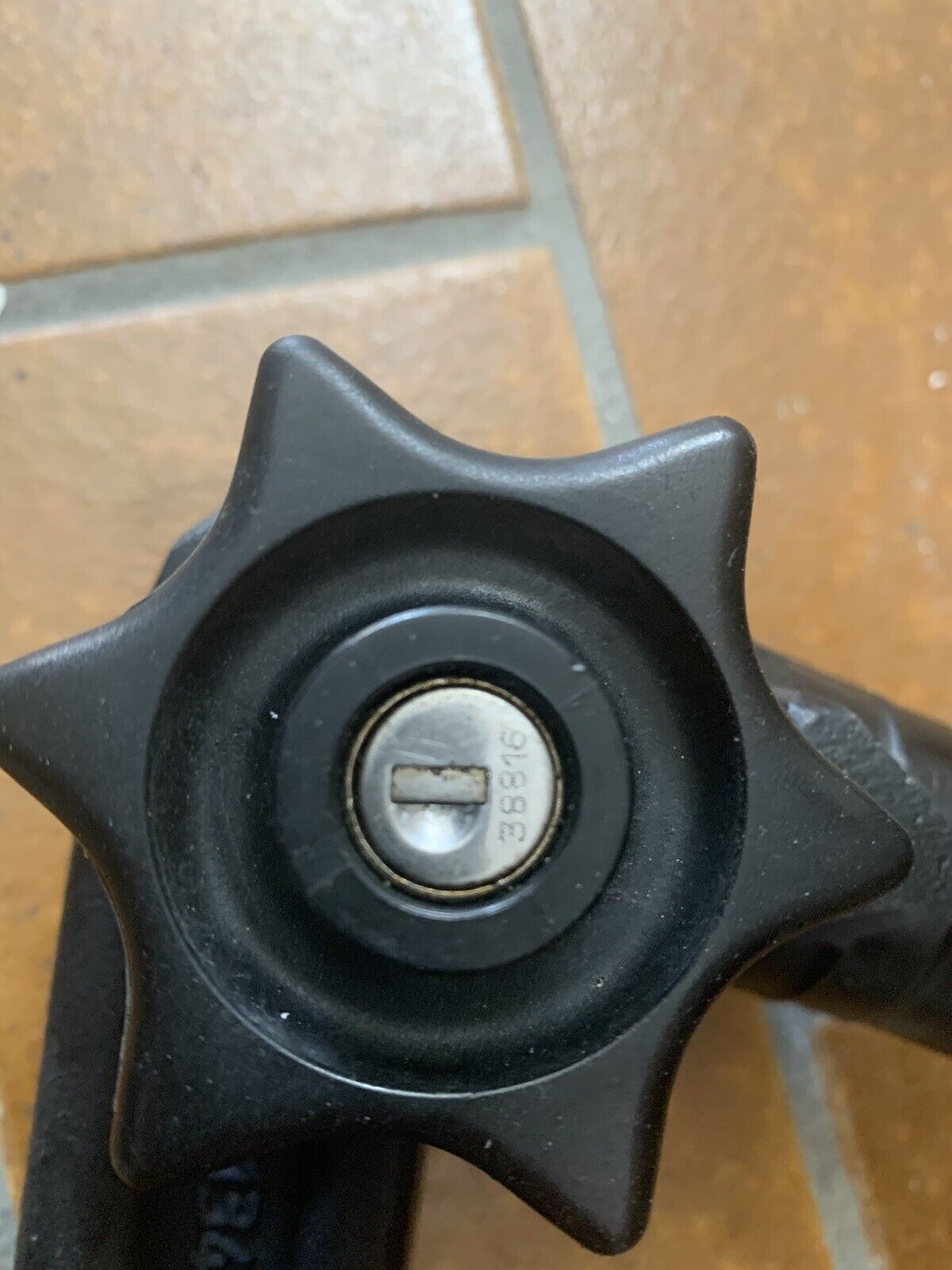
Take a close look at the front of your Westfalia towbar lock, around the keyhole. Many models have a 5-digit code engraved directly into the metal.

If the code is between 20000 and 50000, it is your personal key code.

This code allows professional key services (like MR-KEY) to create a perfectly matched replacement key – without the original.

Examples of valid codes:

23456

27891

49821

You can enter this code directly into an online order form.

Order a replacement key here:

https://mr-key.com/cat/towbars-keys


What if You Only See 3 Digits?

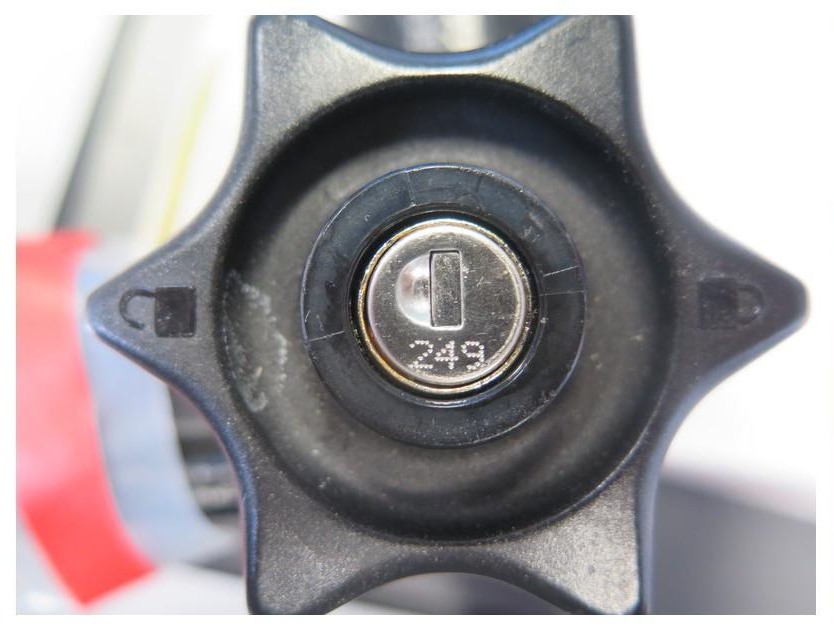
Sometimes, you might only find a 3-digit number on the lock body (e.g., 104, 287). Unfortunately, these numbers are not valid key codes. They usually refer to batch numbers or internal components.
In this case, we recommend:

Conducting a thorough search for the original key (glove compartment, toolbox, jacket pockets, etc.)

If the key cannot be found, consider replacing the towbar locking mechanism


Tip: Make a Spare Key While You Still Can

If you still have your original Westfalia towbar key, now is the perfect time to make a copy.

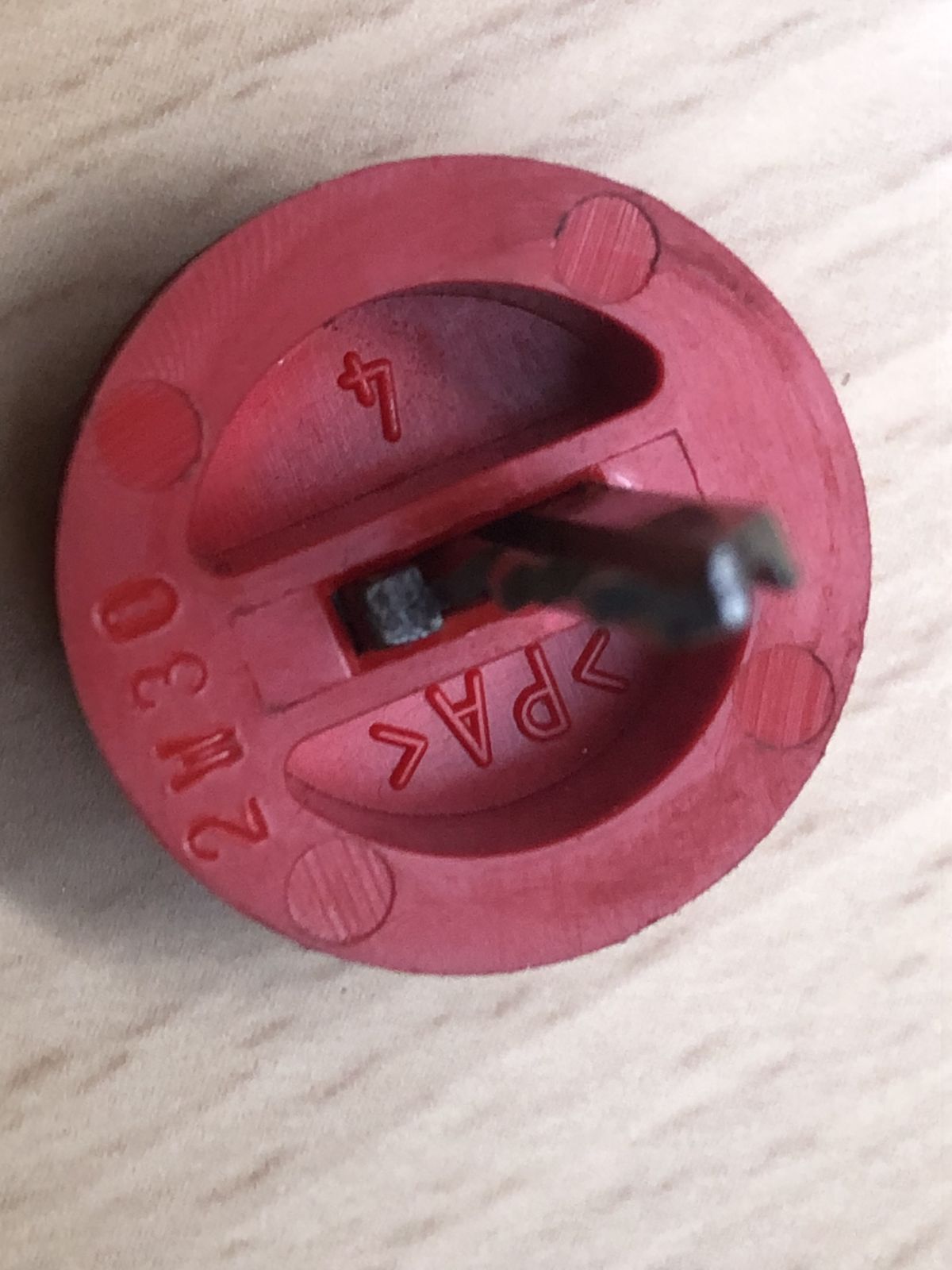
Many Westfalia keys show a code like: 2W01 to 2W50

This code is usually engraved on the metal shaft of the key and matches your towbar lock. With this code, we can quickly and affordably produce a precise duplicate.

Why make a spare key?

Avoid last-minute panic before departure

Reduce costs by preventing lock replacement

Fast delivery when ordering by code

Order here: https://mr-key.com/cat/towbars-keys


Fast and Professional Westfalia Key Service

At MR-KEY, we specialize in duplicating Westfalia towbar keys by code. Our service is fast, precise, and hassle-free:

Simply provide the 5-digit lock code (20000–50000)

We cut the key using high-precision machines

Every key is checked before shipping

In most cases, shipping is completed within 24 hours.


Quick Overview

SituationCan a New Key Be Made?What to Do
5-digit code on the lock (20000–50000)YesOrder a key by code
Only 3-digit number on the lockNoSearch for the key or replace the lock
Original key with "2W" code presentYesHave a spare key made


Tips: How to Avoid Losing Your Key in the Future

To avoid ending up in this situation again, follow these simple tips:

Store your spare key in your vehicle documents folder or glove box

Label your keychain with "Towbar" for easy identification

Take a photo of your key code and save it on your phone or in the cloud

These small steps can save you time, stress, and money.


Losing your Westfalia towbar key doesn't have to ruin your travel plans. As long as your lock has a valid 5-digit code between 20000 and 50000, a replacement key can be made and shipped quickly.

And if you still have the original key? Make a copy now – a small investment for long-term peace of mind.

Order your Westfalia replacement key now:
https://mr-key.com/cat/towbars-keys

Safe travels!

Related Posts

Everything You Should Know About Key Fob Battery Life, Leaks, and Temperature Effects

Everything You Should Know About Key Fob Battery Life, Leaks, and Temperature Effects

The convenience of a modern car key fob is hard to overstate — it unlocks doors, starts engines, and sometimes even controls your car remotely. But at the heart of all these features lies a small coin battery, usually a CR2032, that powers your fob’s every function. Like all batteries, it doesn’t last forever, and certain conditions can shorten its lifespan or cause unexpected problems like leaks. In this guide, we’ll explore how long your key fob battery should last, what causes leaks, and how temperature plays a critical role in battery performance. How Long Do Key Fob Batteries Typically Last? Most key fobs use lithium coin batteries like the CR2032. These are designed for small electronic devices and typically last between two to four years, depending on how often you use your fob and how close it stays to your vehicle. Constant use — such as frequent locking and unlocking — can deplete the battery faster. If your smart key remains within range of your car at all times, it may draw more power passively. Another key factor is the quality of the battery. High-grade batteries like those from Panasonic usually last longer and offer more consistent voltage. You’ll know it’s time for a replacement when the fob works only at short distances, you need to press buttons more than once, or the indicator light becomes dim or fails to light up at all. Catching these early signs is important, as a simple battery replacement can prevent unexpected lockouts or costly service calls. Battery Leaks in Key Fobs: Risks and Prevention Though not as common, a leaking battery can be far more destructive than a dead one. Leakage can corrode the internal components of your key fob, sometimes making it unusable. Signs of a leak include white residue inside the battery compartment, visible corrosion on the metal contacts, or a strange smell or dampness near the battery slot. Leaks often occur in batteries that are expired, low-quality, or exposed to extreme heat or moisture. To reduce the risk of leaks, it's a good idea to replace your key fob battery every two years, regardless of performance. Always use reputable brands such as Panasonic CR2032 , and store spare batteries in a cool, dry place. Also avoid mixing new and old batteries, even temporarily. If you notice any signs of leakage, remove the battery promptly and clean the compartment using a cotton swab and isopropyl alcohol. If the corrosion is severe, replacing the key fob casing or consulting a specialist may be necessary. How Temperature Affects Your Key Fob Battery Life Ambient temperature can have a major effect on battery efficiency. In cold conditions, the chemical reactions within a lithium coin battery slow down, resulting in reduced voltage and sluggish or inconsistent performance. A key fob left overnight in freezing temperatures might stop working until it warms up. On the flip side, high temperatures accelerate battery depletion. Leaving your key fob inside a hot car or near a heat source can shorten its lifespan and, in rare cases, even cause the battery to leak. Heat can also warp internal components, especially in compact spaces like key fobs. To protect your battery, avoid exposing your key fob to direct sunlight or intense heat for long periods. Don’t store it in jackets or compartments that get hot in summer, and try to keep a spare battery handy if you live in an area with extreme seasonal swings. Choosing temperature-resistant batteries — like those from Panasonic — adds another layer of protection. Key fob batteries are small but essential parts of modern car ownership. Understanding their typical lifespan, recognizing early signs of failure or leakage, and knowing how temperature affects their performance can help you avoid unpleasant surprises. With a little foresight, you can keep your key fob working smoothly for years. Replace the battery every two to three years, choose high-quality brands, and take precautions during temperature extremes. A few minutes of care now can save you from frustration later.

How to Clean and Maintain Your Car Key Fob Like a Pro

How to Clean and Maintain Your Car Key Fob Like a Pro

Your car key fob is one of the most used items in your daily life. You press it multiple times a day, carry it in your pocket or bag, toss it on desks, and sometimes accidentally drop it on the ground. But how often do you actually clean or check it? Most people only think about their key fob when it stops working. By then, it's often too late. The good news is, with a little attention and regular maintenance, you can keep your car key fob working perfectly for years to come. In this article, you'll learn how to clean and maintain your car key fob like a pro — so you can save money, avoid frustration, and get the best performance out of your key. Why Cleaning and Maintaining Your Key Fob Matters Car key fobs aren’t just simple remotes. They're packed with sensitive electronics, small batteries, and tiny contact points that can easily get damaged by dirt, moisture, or simple neglect. If you never clean or check your key fob, you might start to notice: Unresponsive buttons Reduced signal range Frequent battery issues Complete failure to unlock or start the car Most of these problems are avoidable with basic maintenance . Cleaning your key fob regularly helps keep it functional, protects its electronics, and ensures it lasts longer. It also saves you from spending money on costly repairs or total key replacements. How to Clean Your Car Key Fob: Step-by-Step Guide Step 1: Open the Key Fob Gently Start by carefully opening your key fob. Most models have a small groove or notch where you can insert a flathead screwdriver or a coin to separate the shell. Be gentle — forcing it open can crack the plastic or damage internal clips. If you're unsure, check your car’s manual or look up your key model online to find specific instructions. Step 2: Remove the Battery Once you open the key fob, always remove the battery before cleaning. This protects the electronic circuit from any accidental moisture and prevents short-circuiting. Set the battery aside in a dry, safe place. Step 3: Clean the Exterior Use a soft, dry microfiber cloth to wipe the outside of the key fob shell. For tougher dirt or sticky areas, slightly dampen the cloth with water or isopropyl alcohol (70% or higher). Avoid using harsh cleaning chemicals that could damage the plastic or remove painted symbols. Step 4: Clean the Buttons and Small Gaps Dirt, dust, and pocket debris often collect around the buttons. These particles can block the buttons from making proper contact or cause them to stick. Use a cotton swab or a soft toothbrush to gently clean around the edges and in between the buttons. For tight spaces, a toothpick can help dislodge stubborn dirt. If needed, lightly moisten the cotton swab with alcohol to break down grime. Always dry the key fob thoroughly after cleaning. Step 5: Inspect and Clean the Battery Contacts Battery contacts can become dirty or corroded over time, especially if the battery leaked or moisture got inside. Check the metal contact points carefully. If you see white powder or greenish residue (common signs of corrosion), gently clean them using a cotton swab dipped in isopropyl alcohol. Be extremely careful not to bend or scratch the contacts. If corrosion is too severe, the key fob might need professional repair or a replacement circuit board. Step 6: Replace the Battery if Needed Key fob batteries typically last between 1 to 2 years, but frequent use, weak signals, or exposure to extreme temperatures can shorten battery life. If your battery is old or low, replace it with a new one. Most car key fobs use CR2032 or CR2025 batteries. Always make sure you install the new battery in the correct position, respecting the polarity (+ / -). A fresh battery not only improves response time but also ensures the signal reaches your car reliably. Step 7: Reassemble the Key Fob Once everything is clean and fully dry, carefully snap the key fob back together. Make sure the casing is securely closed and the buttons feel smooth and responsive. Test the key fob to confirm that it works correctly. Pro Tips to Keep Your Car Key Fob in Top Shape A well-maintained key fob can last many years. Here’s how to keep it working perfectly: Keep it Dry: Most key fobs aren’t waterproof. Avoid rain, puddles, wet pockets, or any contact with liquids. Use a Protective Cover: A silicone or rubber key cover adds shock protection, keeps out dirt, and prevents scratches. Avoid Extreme Heat or Cold: Leaving your key fob in direct sunlight or in a freezing car can damage the battery and weaken plastic parts. Change the Battery Regularly: Don’t wait for your key fob to completely stop working. Weak batteries can lead to unreliable signals and unexpected failure. Don’t Drop It: Even though most key fobs can handle light drops, repeated impact can cause internal damage. When to Replace the Key Fob Shell If your key fob shell is cracked, worn, or no longer closes tightly, it’s time to replace it. A damaged shell can let moisture and dirt reach the electronics and cause long-term damage. Replacing the shell is a quick and affordable solution that can extend your key fob’s life significantly. At Mr. Key , we offer high-quality key fob shells, batteries, and repair kits that can help you refresh your key fob and save money compared to dealership prices. Explore our key fob repair kits, protective covers, and replacement batteries now at mr-key.com . Your car key fob may seem like a small detail, but it plays a huge role in your daily life. Without it, you can’t get in or even start your car. The good news is that taking care of your key fob is easy. With regular cleaning, battery checks, and some simple maintenance, you can keep it working reliably for years. And if you need to replace your battery, your key shell, or your entire key fob, Mr. Key is here to help. We provide everything you need to keep your keys in perfect shape, save money, and avoid unnecessary trips to the dealer.

How to Protect Your Car’s Navigation Screen from Scratches, Glare & Fingerprints

How to Protect Your Car’s Navigation Screen from Scratches, Glare & Fingerprints

Modern cars often pack large touchscreens into the dash, and keeping these displays clear is key to enjoying every drive. A single scratch or dirty spot can make maps and menus hard to read. Car insurers warn that infotainment screens are surprisingly fragile – even a small dent or scratch can disable parts of the system . Worse, replacing a built-in navigation unit can cost thousands and take weeks . The good news? A little proactive care goes a long way. Interior dashboards are loaded with touchscreens that easily pick up scratches and smudges. For example, a high-quality navigation screen protector can shield your display from daily wear . These protectors are often made of tough 9H-tempered glass with an oleophobic coating (to repel fingerprints) and an anti-glare matte finish . A properly fitted protector keeps your screen looking brand-new and makes cleaning simpler. Invest in a Quality Screen Protector Choose the right fit Get a protector cut for your car’s make and model so it covers the entire display without blocking cameras or buttons. Hydrogel protector over tempered glass A hydrogel navigation screen protector is the best modern option for car screens. Unlike tempered glass, hydrogel film is flexible, ultra-thin, and self-healing — meaning small scratches disappear on their own over time. Hydrogel also fits curved or irregular screens better, doesn’t crack or chip like glass, and offers excellent clarity with strong anti-scratch and anti-glare properties. It maintains perfect touch sensitivity and blends seamlessly with the original display. To understand the real differences between hydrogel film and tempered glass — and which one offers the best long-term protection for your car — check out our detailed comparison guide: Hydrogel vs Tempered Glass Navigation Protectors Comparison . Anti-glare & oleophobic coatings Many navigation screen protectors include a matte, anti-glare surface. This scatters harsh sunlight and helps repel fingerprints and oil. (Some even advertise oleophobic layers that resist smudges.) Installation matters Follow the instructions carefully (clean the screen first, align the film, and smooth out bubbles). A misaligned or bubbled protector can itself cause visibility issues. Installing a car screen protector isn’t just about preventing scratches. It also helps maintain screen clarity over time. As one Tesla owner discovered, adding a new glass protector made even a worn, glare-prone screen “look almost new again” If you’ve already chosen a hydrogel protector and want to install it correctly, follow our step-by-step guide on how to install a hydrogel navigation screen protector . Clean Your Screen the Right Way Fingerprints, dust and grease are everyday enemies of visibility. But cleaning improperly can do more harm than good. Follow these expert tips: Use a microfiber cloth Wipe the screen with a soft, clean microfiber towel – even better if it’s dedicated just to your screen . This gentle fabric removes oils without scratching the glass. Spray cleaner on the cloth, not the screen If you need liquid cleaning, lightly mist it onto the cloth first. Never spray cleaners or water directly onto the touchscreen . Too much liquid or harsh chemicals can seep into seams or damage any oleophobic coatings. Avoid household glass cleaners Standard window cleaners (with ammonia or alcohol) can strip away protective coatings or damage the display . In fact, Car and Driver cautions that you should “avoid using household glass cleaner on your car’s touchscreen” unless you know it’s ammonia- and alcohol-free . Use fresh wipes Always use a clean side of your cloth or a new wipe on the screen. AGWS (an auto insurer) advises against using a cloth or wipe that’s already been on the dashboard or door panels – it can transfer grit and actually scratch the display Detail with precision If dirt or fingerprints linger, dampen the cloth with plain water or a gentle, screen-safe cleaner and buff in small circles. For stubborn spots, a second dry pass with the microfiber cloth will remove streaks. Wipe smudges away with a soft cloth – spraying cleaner on the cloth, not on the screen . Clean your screen each time you wash the car, or whenever you notice foggy patches. In fact, one test found that many “interior detailer” sprays (like Chemical Guys or Meguiar’s) can work just as well as specialized screen cleaners if they’re labeled safe for screens. Reduce Sunlight Glare Glare is one of the biggest complaints with modern car touchscreens. It makes maps hard to read, increases eye strain, and leads to drivers pressing harder on the display—over time, this causes wear and visible marks. To reduce glare: Install a matte hydrogel screen protector Adjust the display’s brightness and contrast Avoid cleaning with shiny or oily cloths Park with the dashboard away from intense sunlight when possible Hydrogel films help significantly because they diffuse harsh reflections without dulling the screen. Prevent Fingerprints and Smudges Touchscreens are fingerprint magnets. Oils from your hands quickly accumulate on the surface, especially on climate controls or zoom gestures. Solutions that actually work: Oleophobic coatings (built into many hydrogel protectors) Regular microfiber wipe-downs Avoid touching the screen with sunscreen or lotion on your hands Use voice commands for common actions when possible Drivers notice a big difference after installing a car navi screen protector—much fewer smudges and much easier cleaning. Protect the Screen During Everyday Use Small habits reduce long-term wear: Remove rings before using the touchscreen Don’t store hard objects (keys, coins) near the display Keep dust off the dashboard Avoid pressing with fingernails Use steering-wheel controls when possible Tiny scratches add up, especially on softer automotive materials. FAQ What is the best way to protect a car navigation screen? Installing a car-specific hydrogel screen protector provides the best protection against scratches, glare and fingerprints. Do hydrogel protectors really self-heal? Yes. The top layer softens slightly with heat and pressure, allowing micro-scratches to fade within minutes. Do these protectors affect touch sensitivity? No. Hydrogel films are extremely thin and designed to preserve the original touchscreen response. Can I install a screen protector myself? Hydrogel films are easy to install because they are flexible and bubble-resistant. Most people complete the installation in minutes. Will a protector reduce screen brightness? A high-quality hydrogel film maintains screen clarity while reducing harsh glare. Do car manufacturers recommend screen protectors? Many dealerships now advise using some form of screen protection due to rising replacement costs and increasing touchscreen sizes. Which Cars Benefit Most Some car brands benefit disproportionately from hydrogel screen protection — especially large-format touchscreens in premium models. If you want the full breakdown of the top models for 2025–2026, see our detailed guide on which cars benefit most from hydrogel navigation protection . To protect your own car’s screen from scratches, glare and fingerprints, visit our shop at mr-key.com . Related Guides How to Install a Hydrogel Navigation Screen Protector Which Cars Benefit Most From Hydrogel Navigation Protection? (2026 Overview) Hydrogel vs Tempered Glass Navigation Protectors Comparison

Hydrogel vs Tempered Glass Navigation Protectors Comparison

Hydrogel vs Tempered Glass Navigation Protectors Comparison

Cars and vehicles nowadays often include large touchscreen navigation systems that are prone to scratches, fingerprints and cracks. These displays are expensive to replace – one owner reported a factory infotainment screen costing over $3,000 to swap out – so protecting them is crucial. That’s where navigation screen protectors come in. The two main options are hydrogel film protectors and tempered glass protectors . Below, we compare hydrogel vs tempered glass for car navigation screens, looking at fit, durability, clarity and more, so you can choose the best protection for your car. Hydrogel vs Tempered Glass: The Essentials Tempered glass protectors A rigid, hard 9H glass shield. Excellent scratch resistance, very clear, and feels like the original screen. Best for completely flat displays. Hydrogel protectors A flexible, self-healing polymer film originally used in aviation and military applications. Ultra-thin, edge-to-edge fit, excellent for curved or uniquely shaped screens. Key difference: Hydrogel bends. Tempered glass doesn’t. Fit & Coverage (Hydrogel Wins) Modern cars often have curved or tapered displays. Tempered glass cannot follow these shapes, leaving exposed edges, air gaps or weak adhesion points. Hydrogel protectors conform perfectly to flat, curved and 3D-shaped screens. They wrap the edges, eliminate halo gaps, and achieve full-surface coverage. If your car’s screen isn’t perfectly flat, hydrogel is the correct choice. Scratch & Impact Protection Tempered glass: Extremely resistant to scratches Can crack on impact, sacrificing itself to protect the screen Once cracked, must be replaced Hydrogel: Softer surface, but self-heals micro-scratches over time Doesn’t shatter; absorbs everyday bumps Ideal for preventing long-term wear and swirl marks Glass is harder; hydrogel stays clearer longer thanks to self-healing. Clarity, Glare & Touch Sensitivity Both types maintain high clarity and touch accuracy, but behave differently in real use: Tempered glass: Ultra-clear Glossy surface shows fingerprints easily Good touch response Hydrogel: Crystal-clear or matte anti-glare options Reduces reflections in sunlight — very useful in cars Zero touch interference due to ultra-thin structure Minor micro-bubbles self-resolve within hours If you drive in bright sun or hate fingerprint shine, hydrogel’s matte option is a major advantage. Installation & Removal Tempered glass: Simple dry install One-shot alignment Rigid, so easy to place but unforgiving if misaligned Hydrogel: Dry or wet install Allows micro-adjustments Easy bubble removal No cracking during installation Removal is simple for both, though hydrogel is safer (no glass shards, no risk of breakage during removal). If you want to learn more about how to install your hydrogel navigation screen protector visit our guide. Which Should You Choose? For general car owners with modern infotainment systems, the winner is clear: ✔ Hydrogel protectors are better for most car navigation screens. Why: Perfect fit on curved screens Self-healing surface Anti-glare options Full edge-to-edge coverage Zero loss in touch sensitivity Tempered glass is fine for older or perfectly flat screens — but today’s automotive displays benefit more from hydrogel technology. FAQ Does a navigation screen really need protection? Yes. Screens scratch easily, attract fingerprints, and are expensive to replace. A protector preserves clarity and resale value. Is hydrogel or tempered glass better overall? Hydrogel — unless your screen is perfectly flat. It fits better, reduces glare, and self-heals surface scratches. Will a protector affect touch response? No. Both types maintain excellent touch accuracy. Hydrogel is especially responsive due to its thin, adaptive structure. How do I protect my screen from fingerprints and glare? Use a matte hydrogel film. For more techniques, see our guide on [ How to Protect Your Car’s Navigation Screen from Scratches, Glare & Fingerprints ] . Which cars benefit most from hydrogel protection? Any model with curved, large, glossy or high-resolution displays. See our model list: [ Which Cars Benefit Most From Hydrogel Navigation Protection? ] . For custom-cut hydrogel protectors for your exact car model, visit mr-key.com . Related Guides How to Protect Your Car’s Navigation Screen from Scratches, Glare & Fingerprints How to Install a Hydrogel Navigation Screen Protector Which Cars Benefit Most From Hydrogel Navigation Protection?

Chat with us